

Legal case management software
Assembly Neos is a cloud-based legal case management software that allows law firms to track cases, automate workflows, manage documents, and communicate with clients from a single platform. Our platform helps firms save 75 hours per week through artificial intelligence and automation.


Neos is an essential tool to keep my firm organized and on task. I've used other case management platforms, and Neos is the best.
Ali Toll
The Toll Firm
Benefits of adopting case management software
Efficiency and productivity
Case management software for law firms helps streamline workflows and save time and money. Automation speeds up repetitive tasks such as data input, reducing human error. Your data is all kept in one place, so you won’t spend hours searching for the information you need. Neos Premium and Pro make your PDFs fully text-searchable, so it’s easy to find that needle in a haystack.

Access your files securely from anywhere
Online case management software enables all authorized personnel to access the data from wherever they are. With all your case information safely housed in Microsoft Azure’s secure database, even a globally dispersed workforce can collaborate seamlessly. You also reduce the risk of losing important files, which happens frequently with physical paperwork.

Reduce IT costs
Cloud-based case management software is more cost-effective than its on-premise alternative. You don’t need space for servers, lots of hardware, or even a large IT team. With Neos, your subscription covers all that, as well as continuous data backups, product updates, enhancements, and award-winning customer support.

Access your top applications directly from Neos
The best legal case management software has plenty of integrations in addition to its native features. For example, Neos has integrations with everything from invoicing and billing software to electronic signatures and communications tools.

Improve overall customer satisfaction
Your clients expect efficiency, transparency, and reliable communication. Case management software helps you deliver an improved customer experience, with tools for sending automated updates, tracking billable hours, and easy payment options. You can quickly pull up relevant information when a customer calls, or they can resolve issues via the self-service client portal.

Must-have features & aspects of legal case management software for attorneys
Practice management
Your legal case management software solution should contain features to help your law office run smoothly, such as task management (like the Neos Checklist), project management, and time-tracking functionality. It will simplify your day-to-day admin, giving you more time to spend with clients.
Case management software can also help with scheduling appointments, managing billing and payment processes, and ensuring regular client communication. It even simplifies tracking client data, such as contact information and case notes, so you have it whenever and wherever you need it.
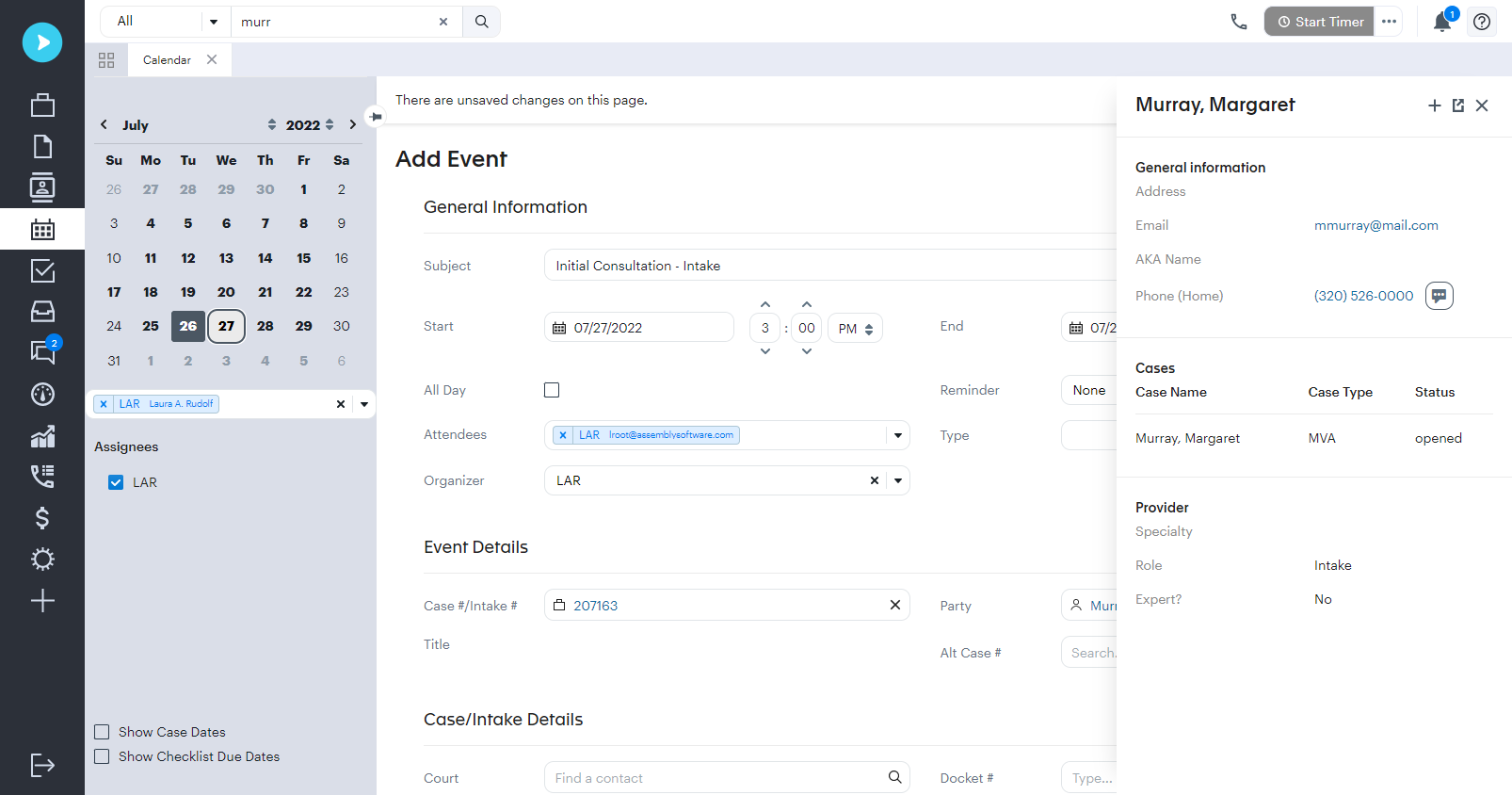
Document management
A great legal case management tool must include exceptional document management capabilities. It has to keep all your files in one place, from signed contracts to practice-specific documents. For example, personal injury firms have thousands of medical records, while family lawyers may keep numerous pre- or post-nuptial agreements on file. When they’re organized, it’s quick and easy to find the file you need. This is especially helpful for litigation management software use cases where document volume is high.
Document management also involves file creation and collaboration. You can create editable templates for the documents you frequently use, saving time and reducing errors while allowing for personalization. In Neos, teams can edit and collaborate within documents in real time.
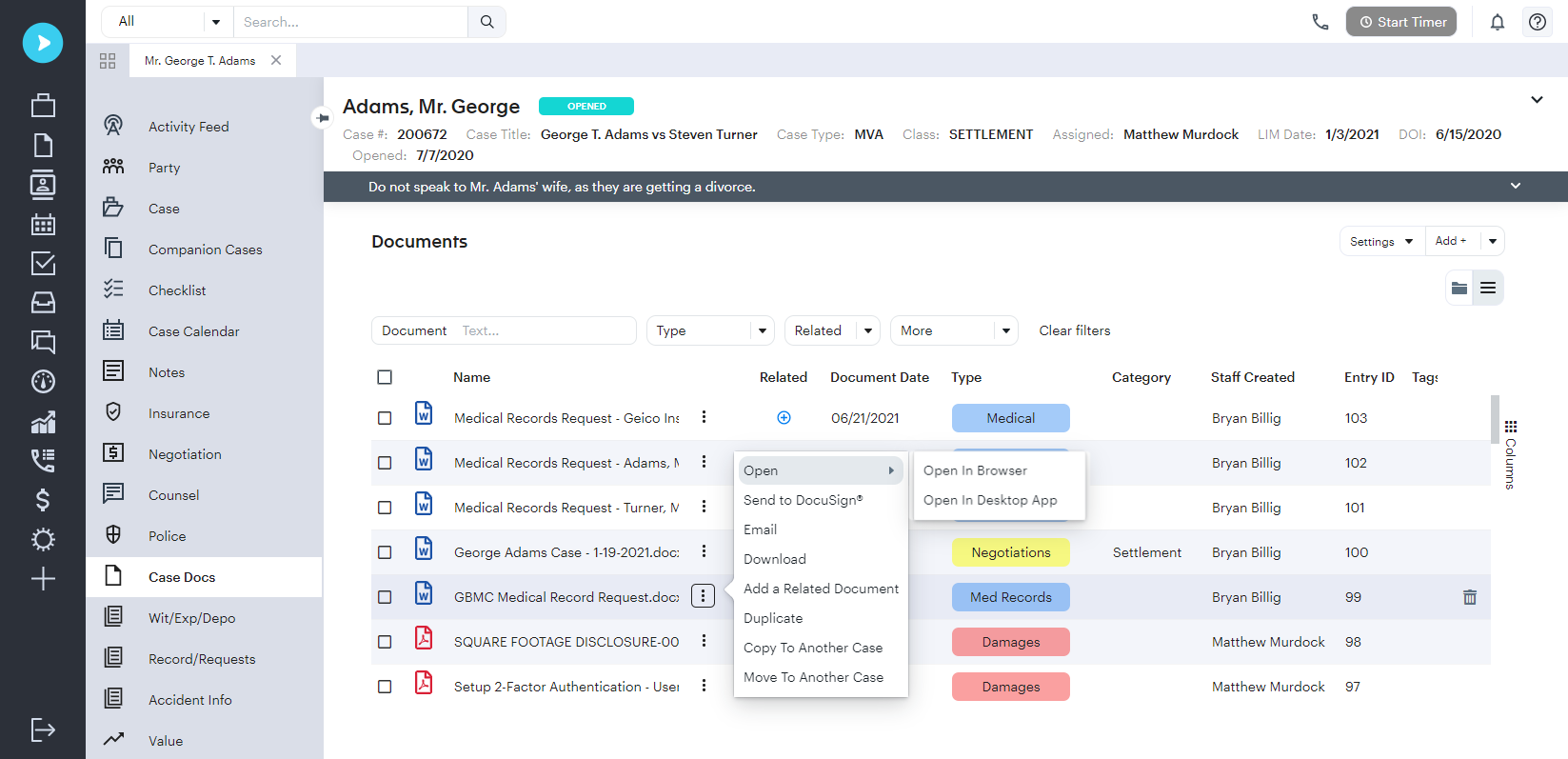
Customizable client intake
Digital intake forms and automatic case file creation are significant advantages of online case management solutions. With Neos, you can capture client information quickly with customizable, dynamic questionnaires and automatic duplication checks.
Modify existing intake templates, create your own from scratch, and even automatically populate intake forms from call-in or web sources.
.png)
Seamless integrations
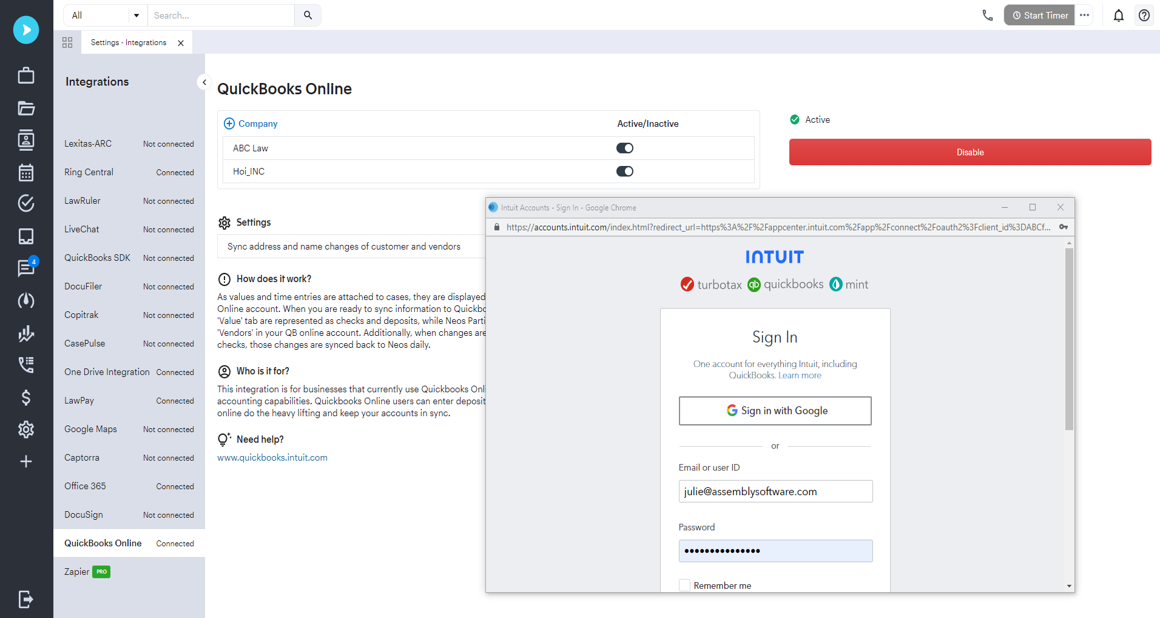
When choosing legal case management software, make sure it integrates easily with other applications you use on a daily basis. You might be looking for expense tracking, reporting, and analytics, or the ability to pull information into case files from your communication channels.
Neos has a growing list of key integrations, including Office365, DocuSign, QuickBooks, and RingCentral. You can automate intakes from multiple sources, collect electronic signatures, and sync with your Outlook calendar.
You can also leverage cost-recovery and payment processing apps, and the Milestones integration lets you automatically send text notifications or mass message clients.
Robust security
It’s vital to ensure that your chosen legal software has top-notch security. Storing your files and data in the cloud is often more secure than keeping them on the premises, as you benefit from the latest security upgrades, data backups, and disaster recovery.
Neos offers even more reassurance, with its multi-region backups, data encryption, and access controls. We’ve partnered with Microsoft Azure to handle your firm’s data, hosting it in multiple data centers and using biometrics and enterprise-level firewalls to keep it safe.
.png)
Quality support
Another critical aspect of legal case management software is the availability of robust customer support—not just during the onboarding process but throughout your time using the platform. It’s also worth looking for a company that provides training, even for seemingly intuitive case management software.
Neos’ Professional Services Team will help you transition to the cloud, then you’ll have full access to a dedicated customer support team once you’re live. There’s also a handy online knowledge base plus on-demand video resources.
.png)
The only legal case management software you’ll ever need
Neos was developed for attorneys, by attorneys. That means it has all the features your law firm could possibly need, from automated workflows and customizable client intake to integrated document management and communications.
The user-friendly platform keeps all your important files and data secure in the cloud and easily accessible for your teams. Combine this with an uptime guarantee of 99.9%, and you can see why we’re confident it’s the best legal case management software available.


What is a legal case management system?
A legal case management system is a centralized software platform that helps law firms organize and manage every stage of a case, from initial client intake through settlement or verdict. It stores case data, documents, deadlines, communications, and billing records in a single accessible location.
Unlike generic project management tools, legal case management systems are built around workflows attorneys actually use such as statute of limitations tracking, case-specific document templates, and client communication logs. For firms handling high volumes of personal injury, mass tort, or litigation cases, a dedicated case management system is the operational backbone of the practice.
What is legal case management software used for?
Legal case management software is a comprehensive digital platform that helps law firms organize, manage, track, and advance all aspects of their cases from initial client intake through case resolution. It serves as the central hub for all case-related information, replacing paper files, spreadsheets, and disconnected tools. Legal professionals use it to automate workflows, generate and store documents, track deadlines, manage client communications, and monitor case progress across their entire docket.
What is the difference between case management and a CRM?
CRM stands for “customer relationship management.” A CRM tracks who you've spoken to and when but isn't built for the work that happens after a client signs. The best legal case management software can handle that and picks up where CRM functionality ends, managing the active cases themselves: documents, deadlines, court dates, task assignments, medical records, and billing.
How much does case management software cost?
Neos Essentials start at $109/user/annually but delivers enterprise-level value, giving personal injury and litigation firms the scalability, customization, and expert support that competing platforms reserve for their highest-tier plans. Cloud-based platforms like Neos offer lower total cost of ownership than on-premise software: no hardware, no IT infrastructure, and updates included.
When evaluating price, consider the value delivered: a $109/user/annually solution purpose-built for personal injury firms saves your team significant time on every case, while a cheaper, general-purpose legal platform’s limited automation and generic legal workflows force your team to conform to the system, rather than the other way around.
How long does it take to implement case management software?
Most firms complete their transition to Neos in 12 weeks, depending on their current setup and data complexity. Some smaller firms can go live in under two weeks. The process includes white-glove implementation, support from an in-house U.S.-based team, pre-configured templates, a pre-production “sandbox” where firms can explore Neos using their cases without risk of impacting existing data or live workflows, and data conversion completed before launch so cases are ready on day one.
What features should I look for in case management software?
When evaluating legal case management software, prioritize document management, customizability, scalability, seamless intake to case capability, deadline tracking, time and billing, secure client communication, platform security, and flexible reporting dashboards. Integrations with applications you use on a daily basis, like QuickBooks, RingCentral or Zoom Phone, eLaw, InfoTrack, DocuSign, and more ensure you won’t have to stray from existing workflows. Increasingly critical: embedded AI for document drafting, summarization, and data extraction, that reduce admin casework time from hours to minutes. Security essentials include SOC 2 Type 2 certification, end-to-end encryption, and multi-factor authentication.
How do I get my team to adopt new case management software?
Successful adoption requires addressing both technical and human factors. Before launch, involve attorneys, paralegals, and admin staff in the selection process; giving the team ownership increases buy-in. Identify 1–2 internal champions who are keen to explore with early access to advocate for the platform. During rollout, ensure your staff attend training sessions that start with 2–3 core features rather than exploring the full platform at once. Choose a case management software vendor that converts your data, migrates your documents, and pre-configures templates before go-live so the system is ready to use, not ready to configure.
How does Neos differ from other legal case management software?
Neos is purpose-built for high-volume personal injury, mass tort, and litigation firms requiring strict deadline tracking. It provides your practice with the specialized depth that general-purpose case management software simply can't match. Built on the proven workflows of Needles and Trialworks, two trailblazing PI and mass tort platforms, Neos leverages decades of legal expertise right out of the box.
Where Neos truly outperforms the competition is in customization and scalability: your firm can tailor workflows to fit the way you actually work, then grow without limits as your caseload expands. Hosted on Microsoft Azure with 99.9% uptime and integrations with Office 365, QuickBooks, DocuSign, RingCentral, InfoTrack, and more, Neos keeps your team connected and productive with embedded AI that accelerates every step of your workflow.