


Legal Tech
NeosAI now auto-assigns SharePoint imports. See what's new in the May Neos release for law firms, including chat upgrades and notification controls.
Legal TechMarch 21, 2026
Spring brings showers and at Assembly, also brings a wave of improvements requested by YOU that make your lives easier, from favorite cases to one-click checklist tasks to more spacious notes, that add up to a noticeably smoother day for your whole team.
Don't forget to sign up for the live demo of the top features with our VP of Customer Education, Bryan Billig, during the New in Neos webinar on April 1 at 1pm ET!
Read the full release with all features, improvements, and enhancements.
An Additional Instructions field is now available on AI Tags, including the Executive Case Summary system tag. The "AI: Manage Prompts" permission has been renamed to "AI: Manage Prompts and Tags" and now applies to both the AI Tags and AI Prompts directories in Settings.
Permission: AI Manage Prompts and Tags
Pre-define Additional Instructions for AI Tags
Note: The Executive Case Summary system tag supports editable Additional Instructions for users with the AI: Manage Prompts & Tags permission.
Additional Instructions for AI Executive Case Summary
Note: The "AI: Manage Prompts & Tags" permission controls visibility — contact your firm administrator to request access.
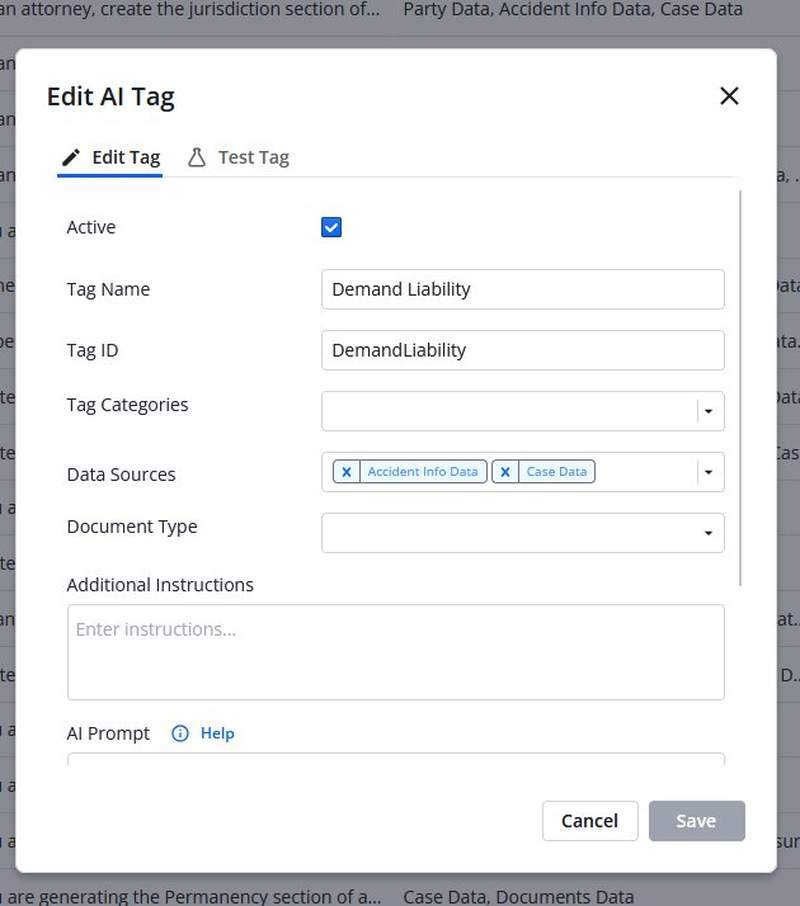
AI-generated outputs are more useful when they reflect firm-specific language, priorities, and standards. Pre-defining instructions at the tag level ensures consistent, relevant AI results across the firm without requiring instructions to be created from scratch each time. Consolidated permission management for both Tags and Prompts simplifies administrative overhead.
A new "Add Value Item" action is now available in the workflow automations editor, allowing firms to automatically create value items on cases when an automation triggers.
Action Required — A Firm Administrator must create automation rules in Firm Preferences > Automations to define trigger conditions and value item defaults.
Action Configuration
When adding the "Add Value Item" action to an automation, the following fields are available for configuration:
Smart Provider Defaults
The Provider field automatically defaults based on the selected Value Code:
Automatic Field Defaults
When the automation fires, the following fields are set automatically (not visible in the action configuration):
Usage Rules
Manually creating value items on cases is repetitive and easy to overlook, especially when the same entries are needed every time a specific event occurs. Automating value creation eliminates that manual step, ensures consistent financial tracking across cases, and reduces the risk of missing billable entries or standard costs.
You can now favorite a case from the three-dot menu in Browse Cases. Favorited cases display a yellow star on the left-hand side of the columns. In Advanced Search, a Favorite filter on the Cases primary record lets you query for favorited cases.
In Browse Cases, click the three-dot menu on any case and select "Favorite Case." Once favorited, a yellow star appears on the left-hand side of the columns. The column can be sorted to show favorited cases at the top.
All favorited cases can be queried in the Cases primary record in Advanced Search using the Favorite filter — filter for Favorite true or false.
Provides a fast way to surface high-priority or frequently accessed cases without scrolling or searching. Sorting by favorites and querying them in Advanced Search saves time during daily case management and makes it easier to stay focused on the work that matters most.
The "last used checklist item" behavior is replaced with a new "+ Add Task..." split button on the Case Checklist. Users can set a preferred auxiliary checklist task type as their Quick Add — the preference is per user and persists across all cases and case types.
Add Task (default click)
Set Quick Add (dropdown option)
After Quick Add is set
Speeds up repetitive task creation by eliminating extra clicks and ensuring the preferred task type is always one click away. Replacing the previous "last used" behavior with an explicit preference reduces errors and puts the most common action front and center.
A new Subscriptions tab in Staff Profile shows all subscriptions a user has for Advanced Search and reports. The grid displays the name of the report or Advanced Search query, format (PDF, CSV), schedule (weekly, monthly), and time. Users can unsubscribe from multiple reports at once.
Without a central view of active subscriptions, it was easy to accumulate outdated or unwanted report deliveries with no efficient way to clean them up. A single management view with bulk unsubscribe eliminates inbox clutter from stale reports and reduces time spent tracking down where subscriptions were configured.
Open your Staff Profile and navigate to the new Subscriptions tab. The grid shows all subscriptions for Advanced Search and reports with the following columns:
Users can unsubscribe from multiple reports at once.
NeosAI Chat is no longer limited to uploading 5 documents at a time. Documents can be added via Add Document or Drag & Drop. Character limits still apply and depend on the AI Mode used. The AI Prompt field in both AI Tags and AI Prompts settings has been increased to 5,000 characters.
NeosAI Chat
Settings > AI Tags and Settings > AI Prompts
Removes barriers to multi-document AI review by lifting the previous 5-document upload cap, enabling broader document analysis in a single chat session. The expanded AI Prompt field gives more room to create detailed, firm-specific instructions.
When activity is logged to a case, the system automatically schedules a summary regeneration in the background. The summary displays a "Pending Regeneration" status while queued, and updates to "Up to date" when complete. Users can force an immediate regeneration at any time.

Accessible from the Case tab and the NeosAI Tools Side Pane.
Ensures case summaries stay current without manual intervention, reducing the risk of decisions based on stale information. Automatic regeneration runs efficiently in the background — batching rapid changes into a single update — so summaries reflect the latest case activity with no extra effort.
The note column in intake and case notes lists now shows up to 1,000 characters in Spacious view (previously 250) and up to 500 characters in Compact view (previously 250). Spacious view wraps text to 2 lines max. Compact view always shows 1 line. The selected view is saved.
Reduces the need to open individual notes just to read their content, saving time when scanning notes lists during case review. More visible text per row means less time spent opening individual notes to find relevant information.
In the Calendar Advanced Search, users can now multi-select Outlook events and cancel them in bulk via the Bulk Actions menu.
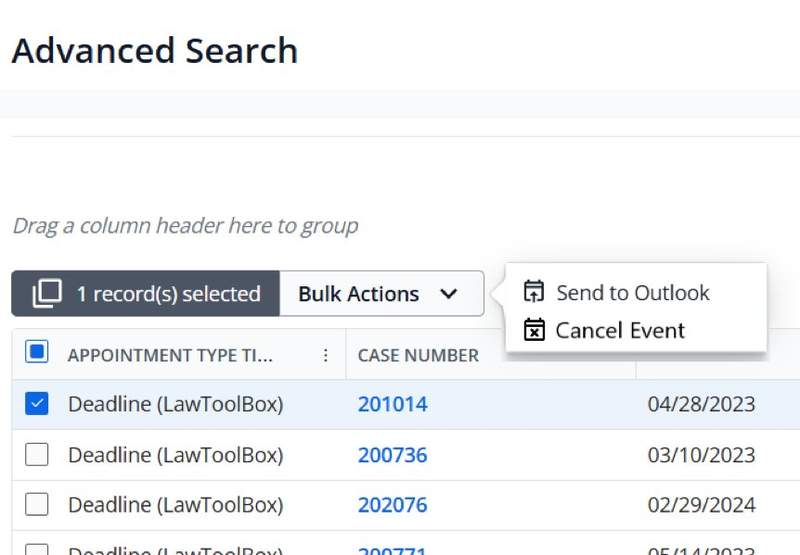
When a case closes or a staff member leaves the firm, cancelling events one by one is time consuming. Bulk cancellation saves significant time and reduces the administrative burden.
Bryan will demo all the amazing new features being released this month in real time, cracking jokes along the way.
SHARE
Legal Tech
NeosAI now auto-assigns SharePoint imports. See what's new in the May Neos release for law firms, including chat upgrades and notification controls.
Legal Tech
Check out all the innovative new features and enhancements coming out with March's brand new release!
Legal Tech
Check out all the innovative new features and enhancements coming out with February's brand new release!


